
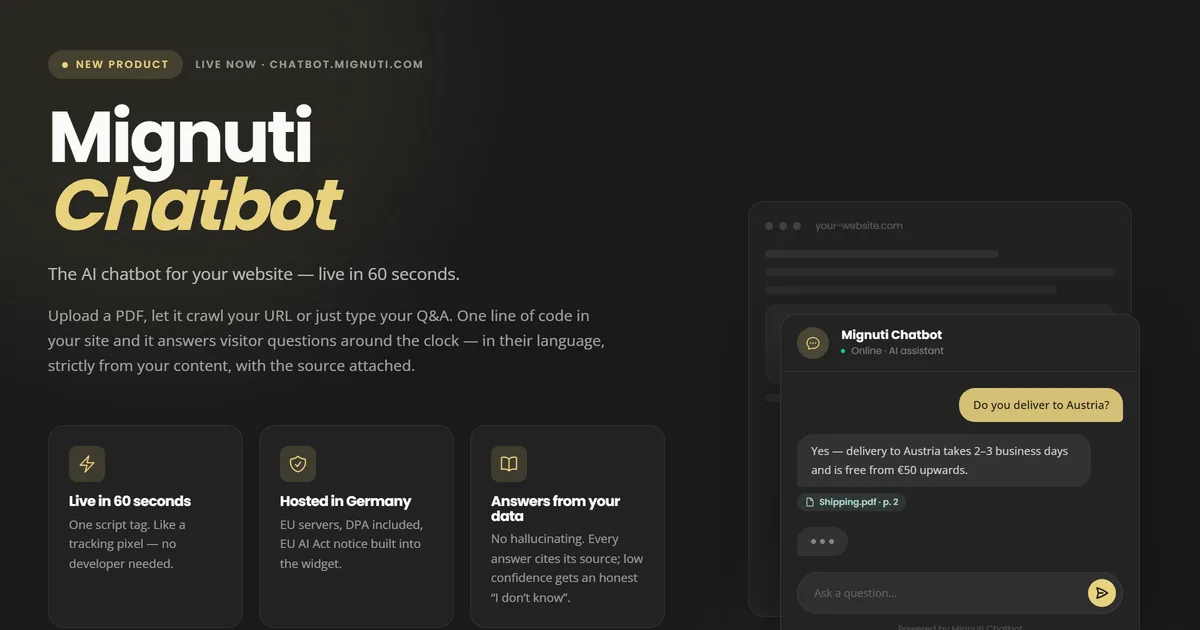
We have launched a new product: Mignuti Chatbot — a chatbot-as-a-service platform that lets you embed an AI assistant into your website to answer visitor questions around the clock. Strictly from your own content, in twelve languages, hosted in Germany. This article covers what it does, how it works technically, and what it costs.
The problem: your website does not answer questions
A website is a monologue. A visitor has a specific question — "Do you deliver to Austria?", "Do I need documents for the first consultation?", "What does a professional dental cleaning cost here?" — and has to assemble the answer from a navigation menu, three subpages and a PDF. Most of them do not. They close the tab, or write an email you will answer next business day.
Both cost money. The closed tab costs a lead, the email costs your time. And the frustrating part: the answer is already on your website. It is just not findable at the moment it is needed.
Embedded in 60 seconds
Setup is three steps, and none of them needs a developer.
First: supply the knowledge. Upload a PDF, let it crawl your website, or type question-answer pairs straight into the dashboard. All three sources can be combined. A pure Q&A bot is live in under 60 seconds, a URL crawl across up to five pages takes under ten seconds, a 25 MB PDF needs roughly ten minutes.
Second: define the look. Colours, logo, greeting, tone of voice and blocked topics — all with a live preview, so you see immediately how the widget sits on your page.
Third: one line of code. Copy a script tag into your website, exactly like a tracking pixel:
<script src="https://widget.mignuti.com/v1.js" data-project="prj_..." async></script>There are ready-made guides for the common platforms — WordPress, Shopify, Shopware and JTL. If you run your own CMS, drop the line into your template and you are done.
It answers only from your content
This is the most important point, and it separates a useful website bot from a liability. Mignuti Chatbot has no internet access. It answers exclusively from the knowledge you gave it — technically through retrieval-augmented generation: the question is matched against your content, and only the retrieved passages go to the language model as context.
Two properties follow from that, both deliberate:
- Every answer cites its source. Below each answer you see which document or page it came from. The visitor can verify it — and the link pulls them deeper into your website instead of sending them elsewhere to check.
- Low confidence means "I don't know". If confidence falls below the threshold, the bot does not guess. It admits it does not have the answer and points to your contact details. A bot that invents delivery dates or fee structures is worse than no bot at all.
Twelve languages, crosslingual
The bot detects the visitor's language and answers in it: German, English, Spanish, French, Italian, Dutch, Polish, Portuguese, Turkish, Arabic, Croatian and Russian.
The key word is crosslingual: your knowledge base can be in one language while the visitor asks in another. A German PDF will answer a Turkish question in Turkish. You do not have to translate your content to be reachable in multiple languages.
GDPR: hosted in Germany
Data protection was not a feature bolted on afterwards, it was an architecture decision. So here is the honest, complete version instead of a GDPR badge:
- The database and all platform data sit on a dedicated server in Germany.
- The LLM fallback runs in Stockholm, inside the EU.
- The primary language model is Claude Haiku 4.5 and runs at Anthropic in the USA — covered by the EU-US Data Privacy Framework and standard contractual clauses. Personal data is automatically masked before it reaches the model.
- The data processing agreement is available directly during onboarding, not on request.
We name the US component openly on purpose. Anyone selling you an AI chatbot as "100% EU" while using a US model is hiding something that belongs in your record of processing activities.
EU AI Act: disclosure built in
Under the EU AI Act users must be able to tell that they are talking to an AI rather than a human. That disclosure is already built into the widget — nothing to configure, nothing to remember. For you as the operator: the notice is there before the first question is asked.
Accessible to WCAG 2.2 AA
The widget was built to WCAG 2.2 AA from the start: keyboard operability, focus order, contrast, screen reader labels. This is not only a matter of decency — the European Accessibility Act has made digital accessibility mandatory for many providers. A chat widget bolted on afterwards that breaks keyboard navigation can knock an otherwise compliant website out of compliance.
36 KB — the widget will not slow your site down
A chat widget that ruins your load time costs more conversions than it wins. Ours weighs 36 KB gzipped — less than an average hero image with poor compression. A CI gate fails any pull request that breaks the 40 KB budget, so the size does not quietly degrade.
Technically the widget runs inside a shadow DOM. Your CSS does not affect the widget, and the widget does not affect your CSS. No broken buttons, no overridden fonts. If you want to know why load time matters so much to us, read our piece on why slow websites lose customers.
Team roles from the first paid tier
Four roles are included from day one: owner, admin, editor and viewer. Your marketing colleague maintains content without access to billing. The managing director reviews conversations without being able to break anything. For agencies running client projects this is the difference between workable and not — most competitors gate team features behind an enterprise tier.
Who benefits most
The bot works hardest where the same questions come up repeatedly and the answers are already documented:
- Tax advisors: client onboarding, deadlines, which documents are needed when.
- Law firms: initial information on procedure types, fee schedules, appointment requests.
- Dental and medical practices: treatments, waiting times, insurance questions — without jamming the front desk phone.
- Estate agents: property details from the brochure, viewing requests, financing questions.
- Online shops: shipping, returns, sizing, availability — the questions that otherwise fill your support inbox.
What does it cost?
You start with a 7-day trial, no credit card (100 messages, one project). After that:
- Lite — €9/month: 500 messages, 1 project, 2 seats.
- Starter — €29/month: 1,000 messages, 1 project, 3 seats.
- Standard — €79/month: 5,000 messages, 1 project, 5 seats.
- Pro — €199/month: 20,000 messages, 5 projects, 10 seats, "Powered by" badge removable.
- Enterprise: custom, white label, no hard limits.
Annual billing saves 20%, roughly two months a year. For most small businesses Lite or Starter is the right entry point — 500 to 1,000 messages a month is more visitor questions than a typical company website receives.
What is under the hood
For those who care: the admin dashboard is React 19 with Vite and Tailwind CSS v4. The marketing site runs on Astro 5, for the same reasons we set out in our article on why Astro is the best framework for business websites. The widget is Preact inside a shadow DOM. Data and auth run on Supabase in the EU, payments through Stripe. Tenant isolation is enforced with row level security and has its own test suite — on a multi-tenant platform that is the one thing that must never break.
Try it yourself
The fastest way to get a feel for it: go to chatbot.mignuti.com and ask the bot a question there. It runs on our own documentation as its knowledge base — so you are testing the product on itself.
If you want a chatbot that reaches deeper into your systems — booking appointments, checking your inventory system, opening tickets — we build that individually. Get in touch, or take a look at what else we do.